# Phoca Cart configuration

### Payment Method Information

In this tab select Klarna Payments HPP as a `Payment Method`.

<figure><picture><source srcset="https://295638926-files.gitbook.io/~/files/v0/b/gitbook-x-prod.appspot.com/o/spaces%2FmaAcOfpfQz3llOEyv2R1%2Fuploads%2FwIUAkmAvxLCRH6tRvRIP%2Fpcp-klarna-screenshot_dark.png?alt=media&#x26;token=8ea983b6-c601-4629-bcce-f4b812e94913" media="(prefers-color-scheme: dark)"><img src="https://295638926-files.gitbook.io/~/files/v0/b/gitbook-x-prod.appspot.com/o/spaces%2FmaAcOfpfQz3llOEyv2R1%2Fuploads%2FsffuFspL0pUQNpQSZVfa%2Fpcp-klarna-screenshot.png?alt=media&#x26;token=8c48a218-8e36-4f74-8cf7-7aa3a57fbec6" alt="Klarna HPP payment method for Phoca Cart. General options"></picture><figcaption><p>Klarna Payments HPP payment method - Phoca Cart. General Options tab</p></figcaption></figure>

* **Calculation Type** — Set calculation type. Available options: *Fixed Amount* / *Percentage*.
* **Cost** — Set shipping cost.
* **Additional Costs** — Set additional costs for payment method. This is a fixed amount added to the cost of the payment method.

### Configuration

* **Sandbox Mode** — *Yes* / *No***.** Sandbox is enabled, no real money will be transferred.

<figure><picture><source srcset="https://295638926-files.gitbook.io/~/files/v0/b/gitbook-x-prod.appspot.com/o/spaces%2FmaAcOfpfQz3llOEyv2R1%2Fuploads%2FwXCFgfgW5MeNir6nJmJQ%2Fpcp-klarna-screenshot1-dark.png?alt=media&#x26;token=66c9a24c-1ed1-478c-a334-6b6cf0723d94" media="(prefers-color-scheme: dark)"><img src="https://295638926-files.gitbook.io/~/files/v0/b/gitbook-x-prod.appspot.com/o/spaces%2FmaAcOfpfQz3llOEyv2R1%2Fuploads%2FT7Fl3WAGGax7ZbbKdOLM%2Fpcp-klarna-screenshot1.png?alt=media&#x26;token=7353af2d-e52b-4ece-af63-b3dcd1e2fb39" alt="Klarna Payments HPP for Phoca Cart. Payment method Options tab. Order Statuses"></picture><figcaption><p>Configuration tab. Order Statuses</p></figcaption></figure>

#### Order Statuses

* **Payment Completed** — select the order status that will be applied based on successful payment transaction result. By default it is *Completed*.
* **Payment Failed** — select the order status that will be applied based on failed payment transaction result. By default it is *Cancelled*.&#x20;

{% hint style="info" %}
Phoca Cart comes with **'Failed'** status which is disabled by default.  To enable it, please go to `Phoca Cart > Order Statuses` and  enable Failed status. If there is no such status, you can create it.
{% endhint %}

<figure><picture><source srcset="https://295638926-files.gitbook.io/~/files/v0/b/gitbook-x-prod.appspot.com/o/spaces%2FmaAcOfpfQz3llOEyv2R1%2Fuploads%2FsdVSoskp6DRfI4uZXvef%2F%D0%A1%D0%BD%D0%B8%D0%BC%D0%BE%D0%BA%20%D1%8D%D0%BA%D1%80%D0%B0%D0%BD%D0%B0%202025-09-12%20%D0%B2%2012.48.59.png?alt=media&#x26;token=eebafac9-3aba-4746-94e3-00b606a3aa1a" media="(prefers-color-scheme: dark)"><img src="https://295638926-files.gitbook.io/~/files/v0/b/gitbook-x-prod.appspot.com/o/spaces%2FmaAcOfpfQz3llOEyv2R1%2Fuploads%2FkHgo02DSz0ghRd87n1bf%2F%D0%A1%D0%BD%D0%B8%D0%BC%D0%BE%D0%BA%20%D1%8D%D0%BA%D1%80%D0%B0%D0%BD%D0%B0%202025-09-12%20%D0%B2%2012.47.23.png?alt=media&#x26;token=4ab7d631-34ad-4405-8218-80e14035bfee" alt="Phoca Cart. Payment Failed status in Order statuses "></picture><figcaption></figcaption></figure>

* **Payment Canceled** — select the order status that will be applied based on canceled status of payment or order. By default it is *Cancelled*.

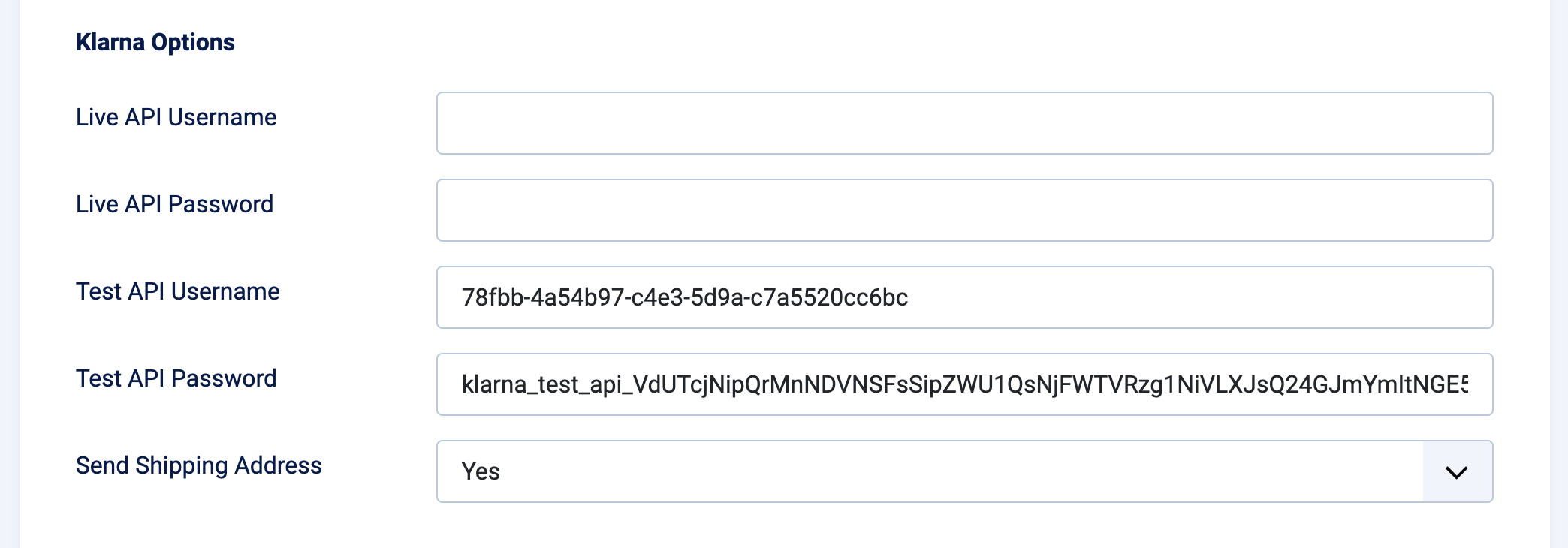
#### Klarna Options

<figure><picture><source srcset="https://295638926-files.gitbook.io/~/files/v0/b/gitbook-x-prod.appspot.com/o/spaces%2FmaAcOfpfQz3llOEyv2R1%2Fuploads%2FQodxmAOSt6O4XAdTzf63%2Fpcp-klarna-screenshot2_dark.png?alt=media&#x26;token=d221705d-4cb0-4d4b-8e3c-8e938e57e0d7" media="(prefers-color-scheme: dark)"><img src="https://295638926-files.gitbook.io/~/files/v0/b/gitbook-x-prod.appspot.com/o/spaces%2FmaAcOfpfQz3llOEyv2R1%2Fuploads%2FmDLx70511n1FAqdzbqw8%2Fpcp-klarna-screenshot2.png?alt=media&#x26;token=9e25383d-3f73-445d-8bb5-650b4ee8ecc9" alt="Klarna Payments HPP for Phoca Cart. Payment method options tab. Klarna options"></picture><figcaption><p>Configuration tab. Klarna Payments HPP options</p></figcaption></figure>

{% hint style="success" %}
You can find options under Settings in your `Klarna Account Panel` > **Settings** > **Klarna API keys**. [See this article](https://docs.norrnext.com/klarna-payments-hpp-for-phoca-cart/klarna-configuration).
{% endhint %}

* **Live API Username** — set your Live API Username
* **Live API Password** — set your Live API Password
* **Test API Username** — set your Test API Username
* **Test API Password** — set your Test API Password

{% hint style="info" %}
API keys are required fields to save the configuration.
{% endhint %}

* **Send Shipping Address** — available options: *Yes*, *No*. Send customer's shipping address.